5 Questions That Could Save Your Business from a Cyberattack
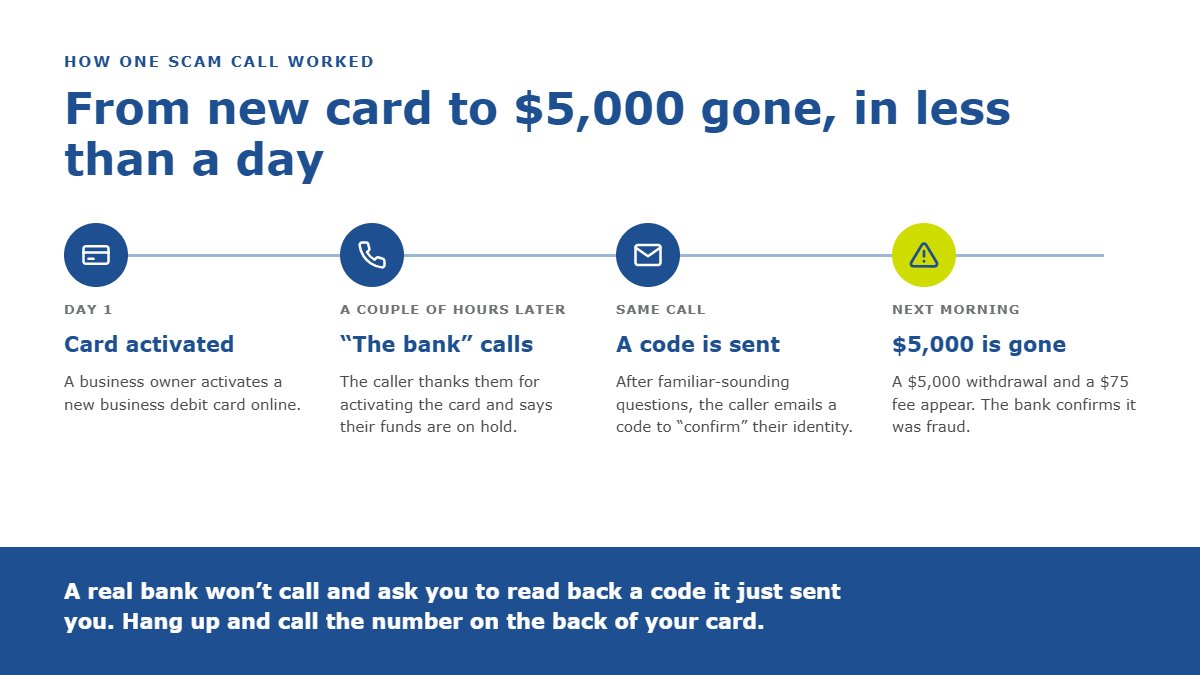
In early September, a business owner shared a story in the QuickBooks online community that every business owner should hear. They had just activated a new QuickBooks Checking debit card. Within a couple of hours, the phone rang. The caller said he was from Green Dot Bank, the bank behind QuickBooks Checking, thanked them for activating the card, and explained that their funds were on hold.
The timing was so exact that it didn’t feel like a scam. The caller asked the same kind of verification questions a real bank would, then sent a code to the owner’s email to “confirm” their identity. Once that was done, he said the hold had been lifted.
The next morning, $5,000 was gone from the account, along with a $75 transfer fee. The bank confirmed it was fraud and closed the account, and the owner was left waiting to find out whether any of the money would come back.
It isn’t an isolated story. Another business owner on the same forum described callers posing as the bank’s own dispute team, who took an additional $5,000 while a fraud claim was already being investigated.
The lesson isn’t about one bank. Scammers know that a well-timed call feels real, and they count on you trusting it.
Stories like these are why October, Cybersecurity Awareness Month, is a good time to stop and check. Every business owner should be able to answer five questions about their own business. Below, we walk through each one, with what a red flag and a green flag look like.
Protecting information isn’t just an IT job. It’s a habit, and it belongs to everyone who handles money, data, or passwords, which is to say every business owner. The threats that cost businesses the most today rarely look like hacking. They look like an ordinary email or phone call from someone you know, asking you to do something ordinary.
When you send us your tax returns, payroll files, and financial statements, you trust us to keep that information safe, and we take that trust seriously.
The five questions
1. Is multi-factor authentication on for your email and financial accounts?
Your email is the front door to almost everything else, including password resets for your bank and payroll accounts. Many fraud schemes start with one compromised inbox.
🚩 Red flag: Logging into email, banking, or payroll with just a password, especially one you reuse across accounts.
Green flag: A second step, like a code on your phone or an authenticator app, on every account that touches money or sensitive data.
2. How would you verify a request to change payment details?
Fake payment requests are among the costliest scams businesses face. They arrive at busy moments, look completely routine, and because wires move fast and are hard to reverse, the money is often gone before anyone realizes.
🚩 Red flag: New bank details sent by email, an unexpected call from “your bank” asking you to confirm a code, pressure to act fast (“I need this out today”), or a sender address that’s almost right.
Green flag: Hang up or stop replying, then call a number you already have, like the one on the back of your card, before you change anything, share a code, or send a payment.
3. Can any one person move money alone?
Most fraud succeeds because a single person, under pressure, can act without anyone else seeing it.
🚩 Red flag: One person can add a vendor, change bank details, and send the payment, with no one else involved.
Green flag: Two people approve anything significant: a new vendor, a change to banking or payroll deposit details, or a large payment. It’s one of the simplest controls there is, and one of the most effective.
4. Do you have an IRS Identity Protection PIN?
The IRS offers a free six-digit Identity Protection PIN to taxpayers who can verify their identity. Once you have one, a return filed under your Social Security number without that PIN won’t be accepted.
🚩 Red flag: No PIN, which means anyone with your Social Security number and a few personal details has a much easier path to filing a fraudulent return in your name.
Green flag: An IP PIN in place, renewed each year when the IRS issues a new one.
5. How do you send sensitive documents to your accountant, bank, or payroll provider?
Regular email was never built for tax returns and bank statements. Attachments can be intercepted, forwarded by mistake, or sit in an inbox for years.
🚩 Red flag: Anyone who asks you to email your tax return, Social Security number, or bank statements as an attachment.
Green flag: A secure, encrypted upload link. If your firm doesn’t offer one, ask why.
Our Green Flags at Lucida Tax + Accounting Solutions
We ask a lot of these questions of our clients, so it’s only fair to answer them ourselves. Here’s what Lucida Tax + Accounting Solutions does to protect the information you share with us:
- Secure file drop-off. Skip the email attachments. You can upload documents straight to us through our encrypted drop-off link, which protects your files both in transit and at rest: Send Files Securely.
- Protected account access. Whether you’re reviewing payroll, accessing your client files, or paying an invoice, each has its own dedicated login on our website, so sensitive information never has to travel through your inbox: Payroll Login | Client Login | Pay Online.
- Multi-factor authentication. Access to client data requires more than a password. Every login is verified, and access is limited to the people on our team doing the work.
- A written information security plan (WISP). Federal law requires tax and accounting firms to maintain a written plan for protecting client information, and we treat ours as a working document, not a box to check. Our WISP spells out how we safeguard your data, who is responsible for it, and how we would respond if something went wrong, and we review and update it regularly.
- 24/7 security monitoring. Our systems are watched around the clock by a security operations center (SOC), a team of security specialists who look for suspicious activity and respond to threats as they happen, including nights, weekends, and holidays.
- Independent security reviews. We don’t just take our own word for it. Outside security professionals regularly review and test our systems to help catch what we might miss.
- Ongoing cybersecurity training. Technology only goes so far. Everyone on our team completes regular cybersecurity training so they can recognize scams, handle sensitive data properly, and know exactly what to do when something doesn’t look right.
- Weekly phishing tests. Every week, our team receives simulated phishing emails designed to look like the real thing. It keeps everyone sharp and shows us where extra coaching would help, so a fake email aimed at your information is far more likely to be caught.
None of this is flashy, and it isn’t meant to be. Good data security is quiet, consistent, and mostly invisible until you need it.
Make October the month you check
Cybersecurity Awareness Month is a good excuse to spend an hour on the basics. Go through the five questions above, and if any answer is a red flag, start there.
We’re here to help. Have questions about how your information is handled at Lucida, or want to talk through your own business’s financial controls? Reach out to your Lucida representative. And whenever you need to send us documents, use our secure file drop-off.
Frequently asked questions
What is Cybersecurity Awareness Month?
Cybersecurity Awareness Month takes place every October. It began in 2004 as a national effort to help individuals and businesses protect themselves online, and today it is led by the Cybersecurity and Infrastructure Security Agency (CISA) and the National Cybersecurity Alliance.
How can I tell if a call from my bank is real?
Assume you can’t, and check for yourself. Hang up and call the number on the back of your card or in your banking app. A real bank won’t ask you to read back a code it just sent you, share your password, or move money to “protect” it.
What should I do if I think I sent money to a scammer?
Call your bank right away and ask them to try to recall the payment, then report it to the FBI’s Internet Crime Complaint Center at ic3.gov. If the payment involved payroll, taxes, or your books, let your Lucida representative know too so we can help you sort out what comes next. Speed matters: the first few hours make the biggest difference.
Is it safe to email my tax documents to my accountant?
Regular email isn’t a safe way to send tax returns, Social Security numbers, or bank statements. Use a secure, encrypted upload link instead. For Lucida Tax + Accounting Solutions clients, that’s our secure file drop-off.
How do I get an IRS Identity Protection PIN?
You can request one through the IRS’s online Get an IP PIN tool at IRS.gov after verifying your identity. The IRS issues a new PIN each year, and you’ll need it to file your return. A Lucida Tax + Accounting Solutions representative can walk you through it as well.
Will Lucida Tax + Accounting Solutions ever ask me to change payment details by email?
No. You may receive routine email reminders from us about an open invoice, and you can always pay those safely through our Pay Online page at lucida.com. But we will never email you new bank details, ask you to wire money to a different account, or ask you to change how you pay us. If you get a message like that, even one that looks like it came from us, don’t reply or click any links. Call your Lucida representative at a number you already have before doing anything.
Ready to move forward? Let Lucida help you put the right financial controls in place, so you can protect what you’ve built and grow with confidence.
